
It’s time to count down your top ten moments of May! Are you ready to scrap the recap?
What’s 10—12? I’m offering a free template with 10 photo spaces (10) each month (x12) and challenging you to scrap the recap and move on to the next month! Use the template to highlight the top 10 photos from a single event or the entire month. It’s all about telling the story, simply!
 Here are some ideas for your May top ten:
- the last day of school
- grilling out
- first super hot day
- garage sale
- wearing shorts
- eating on the porch
- riding bikes
- farmer’s market
The Template
I turned to our Facebook page this time for inspiration. One reader mentioned circular photo spots and I ran with it. I hope you like this one. There are lots of layers and spots for clusters and embellishments!
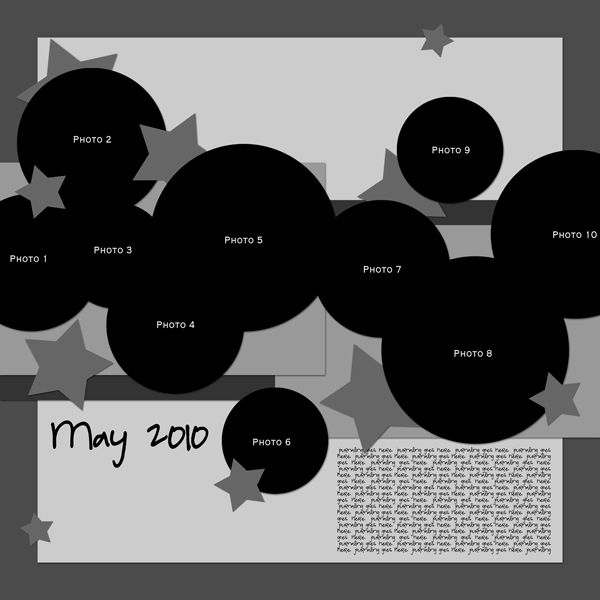
Download link expired
Now tell us, what’s on your top ten list for May? Share a highlight from your month.
Edited to add:
Based on requests from readers, I’ve added an alternate version of the template with square photos to the download file. In this version you can use all squares as show below or mix and match with circles.

Download the template with a Free Membership

So cool to have input into the template. It turned out awesome.
Yep, this one was just for you!
I’ve been waiting! Thanks!!!
Thanks for the template. Good ideas for themes!
Thanks for the template. I’ve decided I definitely like squares/rectangles better. My top 10 photos for this month were very hard to fit into the template properly. Would have taken different sorts of pictures had I known. Still these have been very fun each month and I really look forward to them. Thanks again
One thing you can do is mix up one of the other month’s templates by rotating it! You can also use the circles in this template as placeholders for squares.
I actually just went in and uploaded a new download file for you. It contains a second version of the template with options for square photos.
This is so cute! Good job!
Jennifer, you are the greatest. Thanks for changing them to squares because I’m pretty sure I wouldn’t have been able to figure out how to do that. I do have another question however. When I used the circle template, I saved as a jpeg which I normally do but in each photo I see Photo 1, Photo 2 etc. How do I get these not to show up? Thanks again for creating the square version for me
There is a layer just for the photo numbers, turn it off or delete it.
Thanks for the info. I’m still rather a newbie at this. Started with your January 2010 template. I love them.
I love these templates! Thank you so much!
Love the photo placement! Went to download, even though I normally don’t like circular photos! Am in HEAVEN knowing that you’ve included both templates! Thank you so much!
These are fantastic templates, I love the circles and squares design. Great template! Thank you so much for sharing your talent with us.
Thank you for the template!
Thank you for sharing. Love the circles
Thanks so much for the templates! In my download though, I have two psd files of the circle template, and no version with squares. I only have a preview of the one with squares. Am I missing something here? Thanks!
In the “with squares” version, the circles are enabled as the default. In your layers panel, you need to “turn on” the square layers and “turn off” the circles. Let me know if you need help.
Ahhh… thank you for the speedy reply! I hadn’t opened it in PSE 8 yet, just looked at it in Preview. Now I see how it works. Awesome! Thanks again for the great template. I love both versions! 🙂
Thanks for the great templates, I Scrap for my Red Hat chapter, and since I always have so many pics, they come in real handy.
Th♥nks for sharing!
Many thanks for sharing
I shared this with the gals over at Sisterhood of Scrap (SOS).
THANKS so much!
I used the template for a different purpose but wanted to share the layout. Love how it turned out!
http://www.faithsisters.com/photopost/showphoto.php?photo=52435&nocache=1
OOh that’s great – love the papers you used! TFS!
I wanted to share the page that I made for SOMEONE ELSE with this template. I had 8 photos that I needed to scrap for a photo swap challenge so this lovely template was just calling to me to be used! Thank you for sharing this great template, it is perfect for multi photo layouts and doesn’t look crowded!
http://www.godigitalscrapbooking.com/photopost/showphoto.php?photo=84333&ppuser=11225
Thanks so much!