Scrapbookers of all types face the challenge of keeping files related to our craft in order. From PDF tutorials to JPG sketches, there’s quite a bit of tools and inspiration to manage. Digital scrapbookers have even larger libraries to organize.
In today’s post, Melissa Shanhun demonstrates how she manages her Simple Scrapper Membership files using Photoshop Elements Organizer. As one of our sponsors, Melissa also has a great giveaway for you from Digital Scrapbooking HQ.
Do you want to get organized quickly?
For many people organizing scrapbooking files and digital supplies on their computer seems confusing, overwhelming, and time consuming. Did you know you can organize without buying new software, moving folders or converting files? If you have Photoshop Elements you will love this fresh look at digital scrapbooking organization.
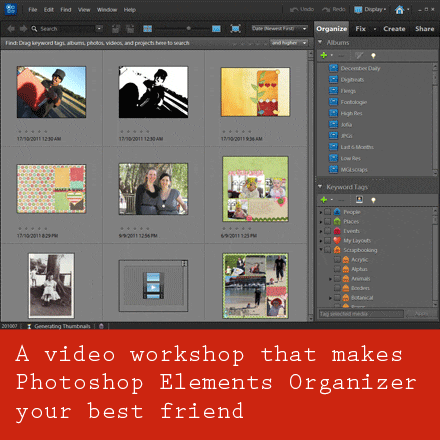
In my most popular workshop, I share the techniques I use to keep organization simple. I introduce you to the Organizer – a tool that’s already on your computer if you use Photoshop Elements. (Editor’s Note: Older Mac versions of PSE came with Bridge instead.) I take you step by step through the process. The resources I provide in the workshop will give you a head start on organization.
What does this mean for you?
- You can start where you are.
- You don’t need technical know how or hours of uninterrupted time.
- You use simple tools to organise your stuff your way.
- You make inroads into your stash in just one sitting.
Giveaway
One randomly-selected participant will receive:
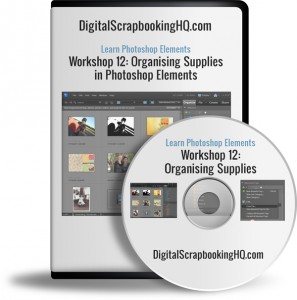
- A 55 minute high definition video workshop
- Keyword tags to get your started with your own organizing journey
- Introduction to Photoshop Elements Organizer PDF
- All the links and handouts mentioned in the workshop
To enter, leave a comment on this post by 11:59pm CDT on Sunday, July 15 with a question you have about organizing scrapbook supplies and other files on your computer.

My biggest question is…..Where do I start??????????? I have accumulated so much, to the point of not knowing where to start first in organizing everything. I am sure there are many more out there just like me, so where do I start? 🙂 Thanks for the chance to win!
Colleen
As a first step I’d suggest you start with either templates (if you use them) or your favourite designer.
Just add all your kits from one designer into the Organiser and that way you’ll get a handle on the system and can grow from there.
Templates are often easy to tag I just tag mine by number of photo spots – again it is very time efficient and you get bang for your buck so to speak.
I hope this helps!
🙂 Melissa
I have thousands upon thousands of files for digital scrapbooking, and imagine my question is similar to the one by Colleen, but also would like to know if the system would files by elements and colors.
Like if I’m looking for a dark pink bow and ribbon…will the system automatically take to what I’m looking for?? Thanks for the chance to win!
Hi Vicki
Yes, it’s just about starting! I suggest your favourite designer or a set of kits you really want to use but keep forgetting about.
In my workshops, I demonstrate tagging previews and individual elements. So you could tag all the ribbons.
You can search by visual similarity in Organizer, even without tags! So you could for example, find all the elements similar to a pale green paper. Very handy!
I hope this helps!
Melissa
I just bought a new camera and Photoshop Elements so this offer couldn’t have come at a better time for me! And I purchased a copy of Everyday Storyteller–love it!
I am overwhelmed with all of the different digital downloads I have accumulated. I can’t decide how to organize them. I am totally confused about the best way–should I break apart kits so I can find all the papers, embellishments, etc. that I have or leave them as kits? Sounds like this is just what I need…hope I win!
Donna,
With Photoshop Elements you can keep your files in kitson your computer, but tag them in as much detail as you like in the Organizer.
In fact you can even tab items with colour, designer, kit, theme and more. In the video I demo tagging templates with Simple Scrapper and the number of photo spots, but you can choose whatever works for you.
In the workshop I demonstrat in much more detail – I’m sure you’d find it helpful 🙂
Melissa
Really need and love this tutorial training.
I have PSE and have been intrigued by this idea of using it to organize my scrapbook files. But am nervous about being totally overwhelmed. What’s the best way to start and once things are organized, how do you find what you’re looking for? THanks!
As a first step I’d suggest you start with either templates (if you use them) or your favourite designer.
Just add all your kits from one designer into the Organiser and that way you’ll get a handle on the system and can grow from there.
Templates are often easy to tag I just tag mine by number of photo spots – again it is very time efficient and you get bang for your buck so to speak.
As for finding what you are looking for you just click on the individual tags (towards the right of the window in the video).
So you could click on the green colour tag and the Christmas theme tag and the tree element tag, and then all your green Christmas trees would pop up.
You can also do advanced searches by file types, pixel widths and more!
I just love Organizer it’s a hidden gem!
🙂 Melissa
I would love a chance to win this! I have tried coming up with my own method and I just can’t figure it out. So frustrating! I am eager to learn more.
I can be frustating! That’s why in the workshop handouts I include 4 different tag setups for you to download and try out before committing to one system.
It will save you the heartache!
🙂 Melissa
I have over 20,0000 files just from one store(my fav). Am I too far gone to start tagging? Is there a quick fix for people like me? I sure hope so! Thanks for the chance to win. I’m sure I’ll learn something even if my scrapbook goodies are a lost cause. : )
Hi Tracy
You aren’t too far gone!! I’ve got 80 000 items tagged. Of course you don’t have to tag every file. You can also find items by searching your Organizer catalogue.
In my workshop I demonstrate ways to get it done fast!
You can also set up smart albums so you can automatically all your products from one designer (for example) without tagging!
I’d suggest starting with previews if you have a really large collection and you are mostly a kit scrapper.
🙂 Melissa
Great ideas here. Thanks for the chance to win!
Man, I have over 1TB of data. I could keyword everyday and still not find my stuff! Maybe I have a problem. LOL
LOL! I am in the same boat with the TBs of data!
You may be surprised – you don’t have to keyword and you can still be organised! 🙂
I already learned a lot just reading your responses. My question: is there a way to create a working file to pick and choose elements to use in layout from acoss folders when you don’t want to use a single kit?
Thanks
Hi Jayne
You can! For my December daily project I selected several kits, templates and put them all into an album in Organizer, then I could easily drag them in from the Organizer or just use the project bi. On Organizer view and all my supplies were there each time I worked on a page.
Hi, Well I already have some of my supplies in my PSE organizer but I find myself having to move things around as I think of other tags and such to use to make it all easier. It has been a rather big challenge and I would love to have other ideas and input. It seems that no matter how many categories I can think of I still keep coming up with more !!!! I fear they are endless. LOL Thanks for the chance to win this valuable organizational tool.
We can all think of more categories. But what matters is how you *look* for things. If you don’t search for crocheted lace as opposed to tatted lace, then just have one category for lace.
If you are creating a layout and want to add a touch of fabric and you don’t mind if it’s lace, ric rac or ribbon, just have one category – don’t waste your time categorising just for categories’ sake!
🙂 Melissa
I’ve just switched from a PC to a Mac & PE 10 (before that was using a different software) so it’s a whole new learning curve for me & need all the help I can get – LOL – thanks for the chance!
I recently got PSE 9. I had PSE 2 before and I have over 2 TB of files. I have been trying to organize by designer except for templates and masks…I have them in separate folders. But it is still a nightmare finding the kit I know I have when I can’t remember who made it or the name….or where I put it. I really need a better system. I have not yet tried organizer so I am dying to learn. Thanks for a chance to win…I really need this. 🙂
My question is …where do I start!!!!
I’ve added a few suggestions in the comments on where to start 🙂
How do you start your pages? What do you spend most time hunting for?
Hello! Do you organize supplies by a lot of different tags or by designer or even digital store names? I’m not sure where to start. Thanks for your help!
Angela
I’d start with how you scrap. Do you want to use kits from a specific designer? Try creating a smart album using the name they use. For eg I have one for Flergs as she uses that name in all her kit items it works a charm.
Personally I tag previews for easy browsing of kits, templates by number of photo spots, papers by colour (and a couple of pattern types eg polkadots or stripes).
Before I became a kit scrapper I worked with a huge list of tags, but I’ve simplified it now 🙂
I love to start with templates or previews as it won’t take you too long and you get great results.
I hope this helps
🙂 Melissa
Sounds so useful!
Thanks – I would love a chance to win your workshop!
I would love to win a copy of your tutorial. My question for you is in the video do you share all your tag categories to give ideas of different tags to put on our photos to help with organization?
If you buy the workshop you get a copy of all my tags, plus 3 different starter packs 🙂
So not only do I give suggestions on different organising styles – you can actually just import my tags and get started instantly (it’s a very quick process)
I would love to win your tutorial! Is there some way to use the Organizer to get brushes organized for easy viewing? Thanks!
Hi Ashley
Organizer doesn’t handle ABR files, sadly, but here’s a suggestion of one way to organise them 🙂
http://www.elementsvillage.com/forums/showthread.php?t=35199
Melissa
I have been doing digital for about a year. When I start a project I get upset because I can’t find the right paper etc for my page so having help with this problem would be a big help. thanks for all your help with the help you send our way.
Thanks Charlyn! 🙂
How would you handle something that should be in two different catagories?
Melinda – the great thing about tags is that you can add 2 or more tags to anything.
In the demo above I add Simple Scrapper and 1 photo tags to the same template. For a green ribbon I could add the tag green and ribbon.
Is that what you mean?
🙂 Melissa
Hi Melissa,
I took your advice and picked up PS 10. I even brought your templates. Now you know I don’t know what I doing b/c I haven’t done anything!lol Not very encouraging huh? I know what you keep saying, just jump in. I will….eventually. But I keep looking at anything digital and of course cont to visit your website. Thanks for the opportunity to win.
Hi Candy
Maybe you could start small?
If a whole page seems overwhelming.
How about just taking a favourite photo, add some text, print it out and pop it on the fridge?
We all have to start somewhere 🙂
Melissa
Short and Sweet. I could use the help in organizing. Thanks for the chance.
I have just purchased elements, and am wanting to try digital scrapping, but am overwhelmed as to how to organize supplies. This would be very helpful!
I have sooo many elements and digital things to organize. Would love to win this workshop.
Just got PSE 10 and have no idea how to start…this would be wonderful! Thanks for the opportunity to win!!!
I have downloaded lots of free digis. Some are PNG and some are jpeg. Many have designer info. Some have pictures. I am at a loss how to store them and what to keep. I started a PNG file but didn’t keep all of the file on some.
A digital download usually includes these items (on average):
– JPG digital papers
– PNG digital embellishments
– JPG preview of everything
– JPG or GIF promo graphics for the designer
– TXT or DOC file with terms of use
I keep everything but the promo graphics and label the folder like this:
Designer – Product Name product type
ex. Susie Designs – Florabella mini kit
If you are new to digital scrapbooking, then I often recommend simply starting with consistent folder labels and then once you know how you look for items, move on to the tagging that Melissa has suggested.
I personally unzip my files into a folder for each designer and just keep all of the files. Because I generally use the Organizer to manage my files I just leave them as the designer named them, I can always refer to the preview for the full kit and designer name and store name. But if you want to use just folders it would be useful to do a bit of tidying and renaming to make it easier to find what you are looking for.
You can see my very simple unzipping method on this tutorial http://www.digitalscrapbookinghq.com/how-to-unzip-your-scrapbooking-supplies/
help organizing would be a blessing; thanks for the chance to win.
Right now on my computer, I have most of my scrapbooking supplies organized by store and then by designer. This works well for posting layouts in store galleries, but is not terribly useful when I want to find the best kit to use with a photo or set of photos for personal use only. I don’t want to bother tagging each element or paper in a kit – just a good way to find the best kit for a project.
Jane – One thing that has worked well for me is to tag just the kit previews so I can browse through those quickly.
I just switched from PSE 7 to PSE 10 and I’m confused about the smart tags that are included in the program. How do I use them or do I need them at all?
I just purchased PSE10, and feel too overwhelmed as to where to start? Even just how long will it take to do things like tagging, and knowing that is necessary is that an easy process? OMG what to do first??? Help me please? Thanks for the opportunity!
I am so interested in digital scrapbooking, but don’t know which kits to start with. any suggestions that won’t break the bank? Free, maybe? Thanks in advance
One Little Bird and Paislee Press, both at Oscraps.com, have beautiful and super versatile kits you can use for many pages.
Oh my word, do I ever need to know how to do this. I have so much stash and it takes a long time to decide on what I want to use let alone find it. This would certainly be a blessing to win this. Thanks for the chance. I just found out about this just in time too. Thanks be to God for that.
It’s a daunting task to even ponder getting my digi stash organized, I don’t know where to start! And I have so many freebies that I might like like 1or2 elements, but don’t want the rest to take up too much space on my hard drive. I have Photoshop CS3 and I would love to get a handle on this before it strangles me in my sleep!
Boy, do I need this! Thanks for the chance.
I sound like everyone else, but I am SO OVERWHELMED! I’ve moved all of my supplies into elements, tagged designer/kit and larger items like templates/paper/previews… I know I need to tag the smaller elements & colors, but every time I think about it, I get cold sweats! :}
Tammy – you don’t *need to tag* the elements/colours unless that’s how you search for things.
Plus Elements can do a visual similarity search for colours anyway!
I’m not sure how to sort, by categories or by designer or by store. I think I spend more time trying to organize than scrapping! Sometimes I don’t have the time to unzip the files that I purchased and I forget to download the paid kits and they expires. Or equally bad, I forge that I already purchased it! 🙁
Can Mac people use organizer? I have PE 8.0 but don’t have organizer but would love to have it.???
Hi Bev
You do have Bridge in version 8 which can be used for organising I’ve linked up some tutorials here: http://bitly.com/bundles/mshanhun/b
but you’d need to upgrade to Organizer on the Mac.
I have ACDSee. do I still need to upgrade from Elements 8.0 to get organizer?
Elements 8.0 on PC came with Organizer. It is only the Mac versions (PSE6 and PSE8 for most) that came with Bridge.
I am using ACDSee on an IMac. Why do you suggest I upgrade to Organizer on the Mac?
Organizer has better built-in features for organization (hence the name) than Bridge. Bridge is meant more for ease of navigation. If you are already using ACDSee, it might make sense to wait until you decide to upgrade PSE to check out how Organizer might be an improvement.
I have been told that PSE Organizer takes a lot of memory and is slow?
Hi Bev
ACDSee certainly has it’s fans – if you are interested in using it to organise why not check out this post at the Daily Digi
http://thedailydigi.com/scrapbook-supplies-reorganization/
I personally use Organizer as I have it included with my version of PSE.
In the past (especially version 8 on the PC) the Organizer was a little slow. However, Adobe is constantly improving the performance of the program. Some operations take lots of RAM (so may seem slow on an older computer), but it doesn’t take much hard drive space with its catalogue.
I’d also stick with what you have if it is working for you. If you are looking for reasons to leave ACDSee
The pros I see for using Organizer 10 vs ACDSee is that Organizer is updated and improved with each time you upgrade PSE. If you regularly upgrade it’s like getting 2 new programs for the price of one.
ACDSee also has a reputation of occasionally losing its tags, and being difficult to restore after a hardware failure. PSE Organizer has a solid backup system – and regular reminders to back up.
I don’t use ACDSee, mostly because I’ve already got the Organizer with PSE and I have heard so much about people losing their ACDSee tags.
I hope this helps, but feel free to email me melissa@mshanhun.com with more questions if you like.
I’m frustrated because I feel like I’m doing more organization than scrapping! I guess the easy answer is to stop shopping 😉 I have everything organized by designer, I have tagged previews, papers, alphas and templates… now I need to tag all the smaller pieces which seems like it will take forever! Any suggestions?
Tammy, I would suggest starting with my free organizing course. Click on the “Become a Member” link at the top of this page and you’ll see how to join for free.
Why not just scrap? You don’t need to tag everything unless you really have a need to.
Do you scrap mostly with kits? Create a smart album for each new kit using the file naming convention the designers uses
Do you mix kits? Tag only your favourite Kraft, white papers, favourite staple and stiches and then use smart albums to find all flowers for instance
If you know how you want to scrap and you can tag just what you need and shop your stash
I’ve got lots more tips in the workshop. But it’s not necessary to tag everything individually even if you want it all organised
I feel pretty organised and I only spend a few minutes on it every couple of weeks
hey I was wondering if you ever have issues with your thumbnails loading. I have over 90000 images and am constantly having to wait for my thumbnails to download. I have deleted my cache, I have optimize and repair catalog. I just can’t get it to speed up. It waste a lot of my scrapbooking time, do you have any suggestions? thanks
Hi Tiffany
I have seen this issue at times. What version of Organizer are you using?
Here’s a few suggestions in the mean time:
Close all your programs and empty the recycle bin on your computer – also try the disk cleanup wizard if you are on a PC
Then reboot your computer.
Close any programs that open automatically when you boot your computer (like virus scanner, drop box etc), then load PSE Organizer.
You can force it to generate the thumbnails by selecting all (Edit->Select All)
The right click on a thumbnail to get the popup menu and select Update Thumbnails for Selected Items.
Leave the computer on for several hours (I would leave it overnight) to allow it to re-generate the thumbnails.
If you are running on 2Gb of Ram or less, it may take several hours to generate 90 000 images.
Personally, I have over 100 000 images in my catalogues and with a lot of RAM and PSE11 I’ve not seen any issues, but with a older PC it can take quite a while to load them all.
Hope this helps!
Melissa
Hey Melissa,
thanks for the help. That worked for awhile but now I am having trouble again. I also found out that I had a bunch of unconnected files and I deleted them all and it started working great. It is so frustrating.
Hi Tiffany
Here’s a couple of links to help with the disconnected files:
http://www.digitalscrapbookinghq.com/disconnected-files-in-photoshop-elements-organizer/
http://www.digitalscrapbookinghq.com/how-to-ensure-all-your-files-are-in-photoshop-elements-organizer/
Hope this helps!
🙂 Melissa
Organizing – don’t we all???? need this??? Thanks
Does Photoshop Elements Organizer work with IMac?
Yes it does Bev. One thing to know is that older versions of PSE for Mac (prior to PSE 8 I believe) didn’t include the Organizer.
Yes, it comes with PSE9 and above.
Another thing to note, in PSE9 & 10 the mapping feature no longer works due to Yahoo’s map API being discontinued.
So, if you are looking to organize your photos, I’d grab the latest version of PSE.
Hello everyone, it’s my first pay a visit at this website, and
post is genuiinely fruitfull in support of me,
keep up posting these types of content.
A great deal of functions on these steam showers, I’m keen on the
radio idea and also the lighting
Hi there, I enjoy reading through your tarot post. I wanted to write a little comment to support
you.
Excellent post however I was wanting to know if you could write a litte more on this topic?
I’d be very thankful if you could elaborate a little bit more.
Thank you!
Melissa do you use a different catalog for organizing photos or the same catalog?
Michelle I do have two catalogs. Since I have 200 000 digi items and about 30 000 photos!
Hope this helps!
🙂 Melissa
Just to follow up on the up-date of this issue on your site and
want to let you know simply how much I appreciated the time you took to produce
this beneficial post. Within the post, you spoke regarding
how to actually handle this problem with all comfort.
It would be my own pleasure to get together some more
concepts from your site and come as much as offer people what I have benefited from you.
Many thanks for your usual excellent effort.