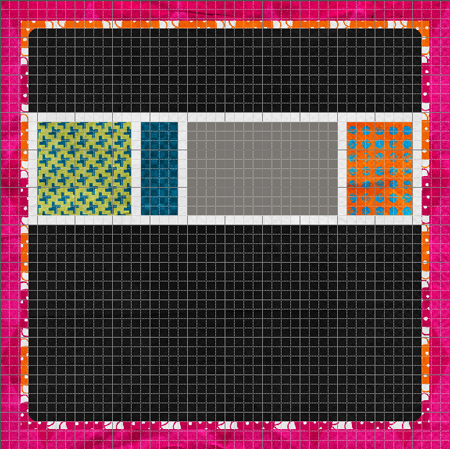
Your graphics editing program has a super-useful feature that is under-utilized by most scrappers. It’s called the grid. In most applications, you can turn the grid on or off in the “View” menu.
The grid helps you to:
- create a perfectly spaced photo or page border
- precisely re-size papers or crop photos
- align elements, text or photos
- design a color-blocked layout
- follow the rule of thirds
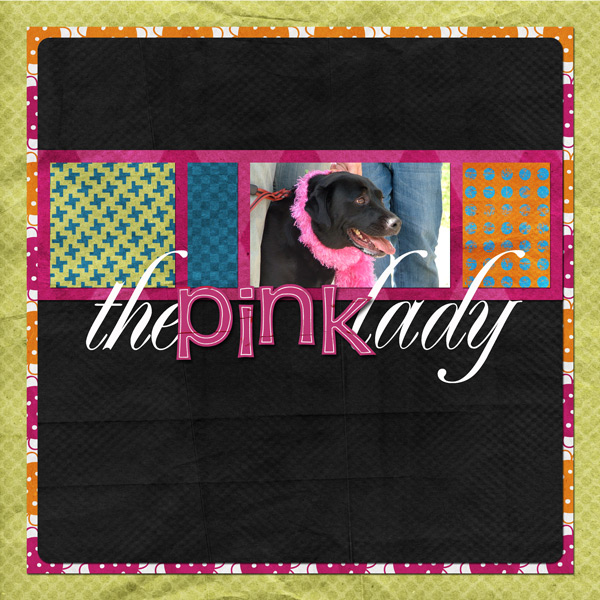
Here’s an example. I blocked this layout completely using the grid, as well as used it to align the text. (And yes, I did also swap out some papers in between this shot and the final.)
Bonus Tip – In Photoshop and Photoshop Elements, you can completely customize the grid size and style by visiting:Â Preferences > Guides, Grids & Slices
Indeed you are correct!!! Duh! I have never even seen that feature, let alone use it!! And that is just dumb, seeing as though I use the rule of thirds and the “grid” on my camera. Everytime someone takes a picture with my camera, they say, “What the heck are these lines for!?” LOL!
Thank you again for yet another brilliant tip. Can ya tell I just love your blog?!?! I tell everyone I know about it. Which reminds me, I need to place a link on my blog! Shoot, meant to do that weeks ago!!!! It’ll be done by tomorrow. I feel as though I am cheating my fellow scrappers and friends by not passing on your wonderful info!
I am not sure how many hits per day your blog gets, but I hope it is a lot. I have learned so much in the short time that I have been following you!
Talk to you soon.
Candi
Candice S.’s last blog post..Some Projects to Share!!
Rawking tip chika!!
Eve’s last blog post..Book Reviews!!!